Receipt to JSON Converter
Upload a photo or PDF of a receipt and see the store, date, line items, VAT and total extracted in seconds. The same data is available as JSON through the WiseOCR API.
Upload a receipt

This is what the API returns
A real receipt and the unedited data the WiseOCR API returned for it (each response also carries a small usage block with the credits used). Every document comes back in the same structure, so you map it into your database or app once.
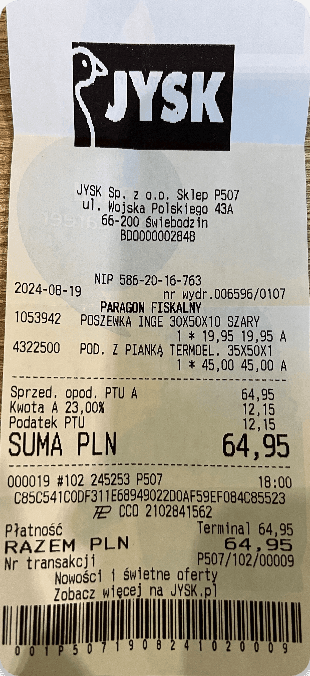
{
  "data": {
    "vendor": "JYSK Sp. z o.o. (JYSK)",
    "time": "2024-08-19T18:00",
    "currency": "PLN",
    "country": "PL",
    "taxNo": "586-20-16-763",
    "documentType": "receipt",
    "totalTax": "12.15",
    "taxDetails": [
      {
        "rate": "0.23",
        "amount": "12.15"
      }
    ],
    "total": "64.95",
    "items": [
      {
        "name": "POSZEWKA INGE 30X50X10 SZARY",
        "quantity": "1",
        "unitPrice": "19.95",
        "price": "19.95"
      },
      {
        "name": "POD. Z PIANKĄ TERMOEL. 35X50X1",
        "quantity": "1",
        "unitPrice": "45.00",
        "price": "45.00"
      }
    ]
  }
}
One request is all it takes:
curl -X POST https://api.wiseocr.com/v1/file \
  -H "Authorization: $WISEOCR_API_KEY" \
-F "file=@receipt.jpg"Fields you get in the JSON
documentType- "receipt" or "invoice", detected automaticallyvendor- store or merchant nametime- purchase date and time in ISO 8601currency / country- ISO currency code and country of the documenttaxNo- the seller's tax ID, when printed on the receiptitems[]- line items with quantity, unit price, discount and pricetotalTax / taxDetails- tax amount and a breakdown per VAT ratetotal- the amount actually paid
Amounts come back as plain decimal strings and dates in ISO format, regardless of how the receipt printed them. The reasoning behind every field, with edge cases like discounts and multi-page PDFs, is in our receipt & invoice JSON schema guide. Prefer no code? The same fields flow into 2,000+ apps through the Make.com integration and Zapier.
Working with invoices? See the invoice to JSON converter.
How receipt to JSON conversion works
Step 1
Upload a photo or PDF
A phone photo of a paper receipt, a scan or a PDF e-receipt from your mailbox - no templates to set up.
Step 2
OCR reads the text, AI structures it
WiseOCR recognises the text, checks that the document really is a receipt, and maps every value to a fixed field.
Step 3
Get the same JSON every time
Every document comes back in one predictable shape, so the code that consumes it is written once - whatever the store, country or language.
FAQ
Frequently Asked Questions
Yes. The demo calls the same endpoint as the API. The demo renders the result as a table; the API returns the exact same data as JSON, like the example above.
JPG, PNG and other common image formats, and PDF files up to 5 pages. Phone photos work as long as the text is readable.
Yes. The same API detects the document type automatically, and invoices additionally return the invoice number and, when printed, net amounts per line. See the invoice to JSON converter for an invoice example.
Yes. The example above is a Polish receipt in PLN. WiseOCR returns the ISO currency code and country with every document, so you can process receipts from many countries in one pipeline.
Yes. The WiseOCR apps for Make and Zapier send the extracted fields to Google Sheets, accounting software and thousands of other apps without any code.
You pay per scanned page, from $0.03 per page on the largest credit pack. You can buy credits once or subscribe monthly - there is no minimum monthly fee.

Turn receipts into data, effortlessly
Stop wasting time on manual entry — automate it with WiseOCR
Get Started Now