
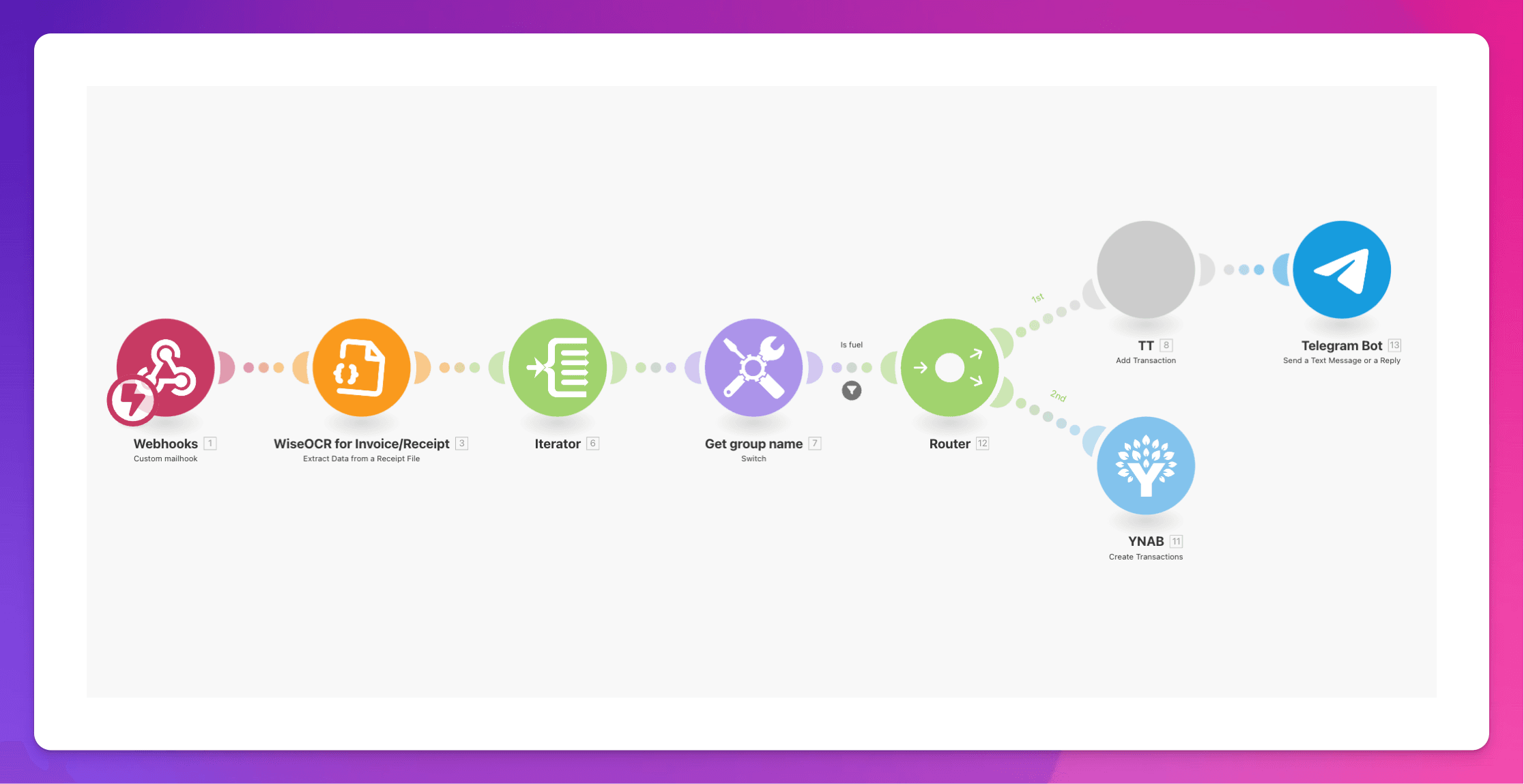
WiseOCR's native Make.com integration lets teams turn receipt and invoice images into structured JSON and automatically push that data to thousands of apps, eliminating manual entry and accelerating finance workflows end‑to‑end. In practice, the combination of our accurate extraction and Make's visual automation enables consistent, secure, and scalable document processing across accounting, reporting, and back‑office systems.
Why This Integration Matters
- The integration removes error‑prone manual typing by extracting key fields from receipts and invoices and delivering clean, standardized JSON to downstream tools.
- Make.com connects our service with 2,000+ apps, so extracted data can flow into CRMs, ERPs, spreadsheets, help desks, or task managers without custom code.
- We focus on accuracy and reliability (with strong results on high‑quality inputs), ensuring trustworthy data as the foundation for automations.
What WiseOCR Does
- WiseOCR converts photos, scans, or text of receipts and invoices into a consistent JSON schema via a simple API, designed for fast integration with existing systems.
- Multiple input options are supported: direct file upload, URL-based files, and raw text, enabling flexible ingestion depending on workflow and source systems.
- Responses include vendor, time, currency, country, line items, and totals where applicable, providing all essentials for expense management and bookkeeping automations.
How It Works on Make.com
- Make.com provides a visual way to connect our service with other apps, so extracted data can automatically populate destinations like boards, sheets, or tickets as part of multi‑step scenarios.
- The WiseOCR app on Make.com is built for syncing data between platforms, enabling powerful automated workflows across finance, operations, and back‑office stacks.
- WiseOCR also highlights the Make.com integration, underscoring a turnkey path from image to workflow automation at scale.
Core API Capabilities
- Authentication is handled with an API key in the Authorization header, following a straightforward, developer‑friendly pattern.
- The file endpoint accepts images and PDFs and returns structured JSON; a skipItems parameter can speed up processing when line‑item detail is not required.
Setup in Brief
- Create an API key from the WiseOCR dashboard and secure it according to best practices (environment variables, rotation, separate keys per environment).
- In Make.com, add the WiseOCR app to a scenario and map inputs and outputs to target apps, leveraging Make's visual builder to orchestrate the downstream flow.
- Validate the JSON mapping to ensure all required fields (like totals, currency, vendor, time) land in the correct destinations and formats.
Popular Use Cases
- Expense management: auto‑capture receipts, enrich records, and route data to accounting or reimbursement tools for faster month‑end closes.
- Bookkeeping: ingest invoices, standardize vendor details and totals, and push entries to ledgers or approval workflows seamlessly.
- Receipt organization and tax prep: centralize and categorize documents with consistent metadata for reporting and compliance.
Best Practices
- Use high‑quality scans or photos to maximize extraction accuracy; WiseOCR emphasizes accuracy with strong performance on clear input images.
- Enable skipItems when only header totals or summary data are needed, cutting processing time for volume workloads.
- Monitor rate limits and design Make scenarios to batch or queue documents during spikes to maintain throughput and stability.
Security and Reliability
- WiseOCR processes data securely and prioritizes privacy, with practices aligned to protect sensitive information through secure processing and default cleanup behaviors.
- API key handling guidance and separation of development/production credentials help maintain a robust security posture in automated pipelines.
- Clear error messaging and versioned endpoints support resilient, maintainable automations as requirements evolve.
Pricing and Credits
- WiseOCR uses a flexible pay‑as‑you‑go model with credits that feature one‑year validity, allowing teams to scale usage without subscriptions.
- Each successful image or PDF page scan consumes one credit, making costs predictable and aligned with document volume.
Real‑World Flow Example
- Ingest: a receipt image or PDF arrives in cloud storage or via form upload; Make triggers a scenario that passes the file to WiseOCR for parsing.
- Transform: WiseOCR returns standardized JSON with vendor, time, currency, items, and totals, ready for mapping into target schemas.
- Deliver: Make routes the structured data to 2,000+ apps—from boards and spreadsheets to accounting and BI—keeping records consistent across teams.
Why WiseOCR + Make.com
Combining WiseOCR and Make.com unifies accurate AI extraction with limitless no‑code routing, shrinking manual work while improving data quality. This integration pairs trusted, structured JSON output with a powerful automation canvas, enabling scalable, end‑to-end document workflows for finance and operations teams.