
Reading time: ~10 min
You need to extract data from receipts or invoices. You Google "receipt OCR API" and suddenly you're drowning in options: traditional OCR engines, AI-powered APIs, multimodal LLMs that promise to read anything, open-source models you can self-host, and cloud services from AWS, Google, and Microsoft.
How do you pick the right one? And does "AI-powered" actually mean anything, or is it just a marketing label?
This article breaks down the real differences between traditional OCR and modern AI approaches to receipt processing. No vendor rankings, no "best of" lists — just a practical guide to help you make a decision that fits your project.
What "Traditional OCR" Actually Means
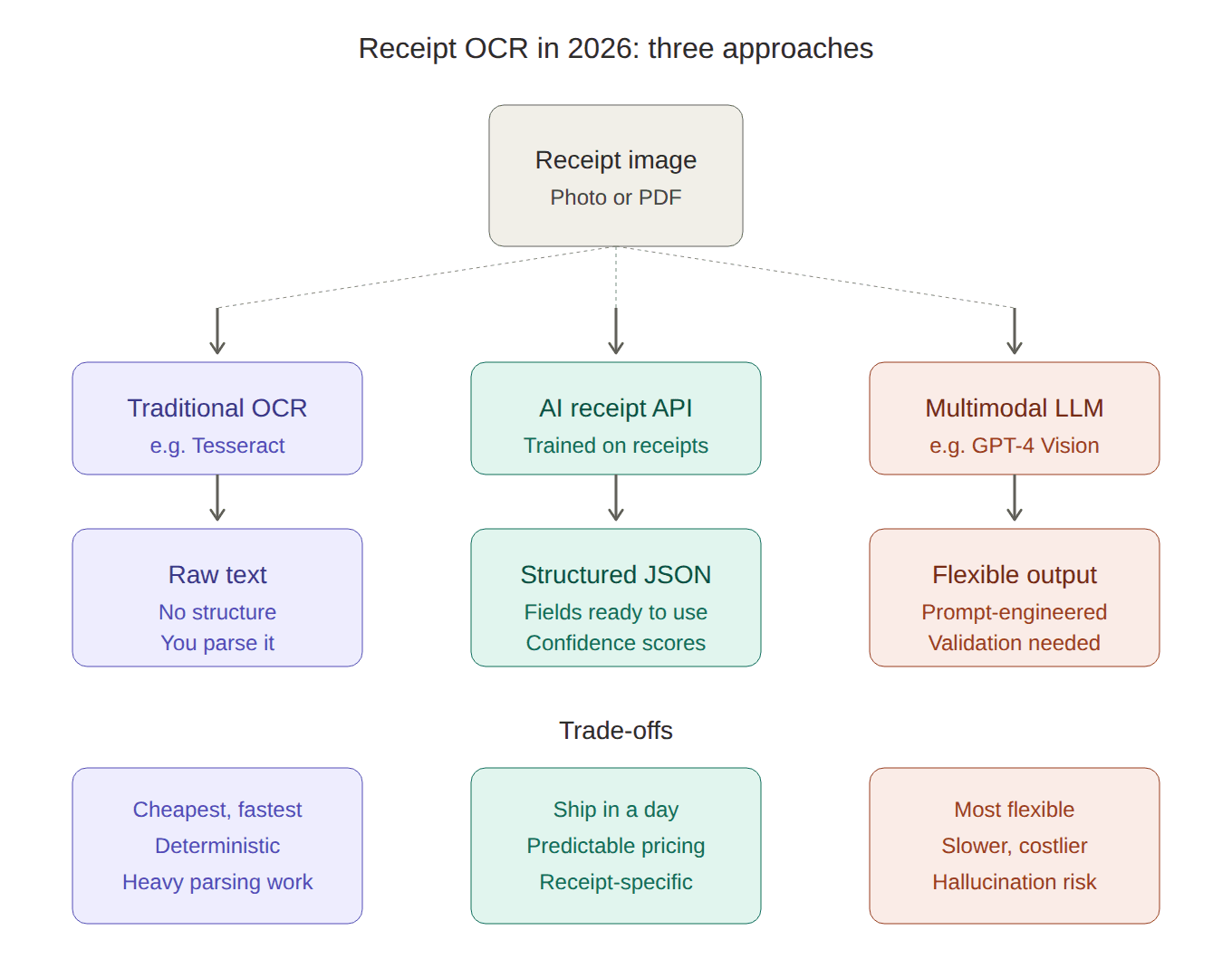
Traditional OCR works in a straightforward pipeline: it looks at an image, detects regions with text, segments individual characters, and matches them against known patterns. Think Tesseract — the open-source engine originally developed by HP in the 1980s and now maintained by Google.
This approach is fast, deterministic, and cheap. You know exactly what you'll get: raw text, in the same order it appears on the page. No surprises, no hallucinations. For a clean, well-printed PDF invoice with a consistent layout, traditional OCR works fine.
The problem starts when you hand it a crumpled receipt from your pocket. Thermal paper that's fading. A photo taken at an angle under bad lighting. Suddenly that 95% character accuracy drops to something much less useful — and more importantly, you get a wall of unstructured text. The OCR can tell you what characters are on the page, but it has no idea that "12.99" is a line item total and "GROCERY MART" is the merchant name.
You'd need to write your own parsing logic to extract structured data. That's a significant engineering effort, especially when every receipt looks different.
What Changed: The AI Layer
Modern receipt OCR APIs don't just read characters — they understand documents. The shift happened in two waves.
Wave 1: Deep learning OCR (2018–2023). Companies like Mindee, Veryfi, and Tabscanner trained specialized neural networks on millions of receipts. These models learned the spatial relationships and visual patterns specific to receipts and invoices — where totals typically appear, how line items are structured, what tax fields look like. The result: structured JSON output instead of raw text. You send an image, you get back fields like merchant_name, date, total, line_items with high accuracy.
Wave 2: Multimodal LLMs (2024–now). Models like GPT-4 Vision, Gemini, and Mistral OCR can look at a document image and extract information without any receipt-specific training. You can literally ask "what's the total on this receipt?" and get an answer. This sounds magical, and sometimes it is. But it comes with trade-offs that matter in production.
The Trade-offs That Actually Matter
Accuracy
For clean, printed text on standard documents, both approaches now achieve over 95% character-level accuracy. The difference shows up on the edges: crumpled receipts, faded thermal paper, handwritten annotations.
AI-powered receipt APIs that are specifically trained on receipts tend to perform better on these edge cases than general-purpose OCR. They've seen millions of similar examples during training.
Multimodal LLMs are strong at understanding context — they can often infer a merchant name even from a partially visible logo. But they can also hallucinate. An LLM might confidently report a total of $42.50 when the receipt actually says $45.20. In most cases this is rare, but for financial data, "rare" isn't good enough. You need confidence scores and validation, which purpose-built OCR APIs provide and raw LLM calls typically don't.
Cost
This is where the paths diverge significantly:
| Approach | Approximate Cost per Page | Notes |
|---|---|---|
| Tesseract (self-hosted) | ~$0 (infrastructure only) | Raw text only, no structured extraction |
| AWS Textract | $0.0015 (basic OCR) | Structured extraction costs $0.01–$0.05/page |
| Google Document AI | ~$0.03/page | Includes layout understanding |
| Specialized receipt APIs | $0.05–$0.15/page | Structured JSON, receipt-specific fields |
| GPT-4 Vision | ~$0.01–$0.05/page | Varies by document size, token-based pricing |
| Self-hosted open-source models | $0.001–$0.007/page | Requires GPU infrastructure and maintenance |
The pricing story isn't straightforward. Specialized receipt APIs charge more per page, but they give you production-ready structured data with no additional engineering. Using an LLM might look cheaper per call, but you'll need to add prompt engineering, output validation, retry logic for hallucinations, and structured parsing — all of which cost engineering time.
For a startup processing 1,000 receipts per month, the API cost difference between options is negligible (maybe $50–$150/month). The real cost is developer time. For an enterprise processing 100,000+ documents, per-page pricing dominates, and the math shifts toward cloud OCR services or self-hosted solutions.
Speed
Traditional OCR and specialized APIs process a receipt in milliseconds to a few seconds. LLMs typically take 2–10 seconds per document, sometimes more for complex multi-page invoices.
If you're building a mobile app where a user scans a receipt and expects instant results, latency matters. If you're processing a batch of invoices overnight, it doesn't.
Structured Output
This is the key differentiator. Here's what you get from each approach:
Traditional OCR (e.g., Tesseract):
GROCERY MART
123 Main Street
04/02/2026

Milk 2% 1gal     3.99
Bread wheat       2.49
Eggs dozen        4.29
                 ------
Subtotal         10.77
Tax               0.86
TOTAL            11.63
Just text. You'd need custom regex and parsing logic for every receipt format.
Specialized receipt API:
{
  "merchant": "GROCERY MART",
  "date": "2026-04-02",
  "line_items": [
    {"description": "Milk 2% 1gal", "amount": 3.99},
    {"description": "Bread wheat", "amount": 2.49},
    {"description": "Eggs dozen", "amount": 4.29}
  ],
  "subtotal": 10.77,
  "tax": 0.86,
  "total": 11.63,
  "currency": "USD"
}
Production-ready JSON. Plug it into your accounting system.
LLM (prompted for extraction): You can get similar JSON, but you need to design the prompt carefully, handle cases where the model returns slightly different field names, and validate that numbers actually add up. It works — but it's a different kind of engineering than simply calling an API.
Privacy and Compliance
If you're processing financial documents, where the data goes matters. Traditional OCR like Tesseract can run entirely on your own infrastructure. Cloud APIs send data to third-party servers — check their data retention policies. Most enterprise-grade APIs delete uploaded documents after processing, but "most" isn't "all."
LLMs add another layer of concern. If you're using OpenAI's API, your receipts pass through their infrastructure. For many businesses, especially in the EU under GDPR, this requires careful consideration of data processing agreements.
Some newer open-source models (OlmOCR-2, DeepSeek-OCR, Nanonets OCR 2) can be self-hosted, giving you LLM-level understanding with on-premise data control. The trade-off is that you need GPU infrastructure and the expertise to run it.
The Hybrid Approach: What Smart Teams Are Doing
The most effective production setups in 2026 don't pick one approach — they combine them. The pattern looks like this:
- Fast, deterministic OCR handles the standard extraction (merchant, date, total, line items)
- AI/LLM layer kicks in for edge cases: unusual layouts, handwritten notes, receipts in unfamiliar languages, or documents where the first pass returned low-confidence results
This gives you the speed and predictability of traditional OCR for 90% of documents, and the flexibility of AI for the hard 10%. It's more complex to build, but it optimizes both cost and accuracy.
Decision Framework: Which Approach Fits Your Project?
Choose a specialized receipt OCR API if:
- You need structured JSON output with minimal development effort
- You're building an app or automation and want to ship fast
- Volume is low to moderate (under 50,000 pages/month)
- You need receipt-specific fields (line items, tax, tips, payment method)
- You want predictable per-page pricing
Choose cloud OCR (AWS Textract, Google Document AI) if:
- You're already on AWS/GCP and want tight infrastructure integration
- You process high volumes and need the lowest per-page cost
- You have engineering capacity to build parsing logic on top of raw extraction
- You need to handle multiple document types, not just receipts
Choose LLM-based extraction if:
- Your documents have highly variable layouts that defeat template-based approaches
- You need contextual understanding (e.g., inferring categories, handling multiple languages on one receipt)
- Volume is moderate and you can afford the latency
- You have engineers comfortable with prompt engineering and output validation
Choose self-hosted open-source if:
- Data privacy is non-negotiable — nothing leaves your servers
- You have GPU infrastructure and ML engineering capacity
- Volume is high enough that API costs become a serious budget item
- You're comfortable maintaining and updating models yourself
What This Means in Practice
Let's say you're building an expense management feature for a SaaS product. Your users will snap photos of receipts and expect structured data in their dashboard.
In 2024, your realistic options were: spend weeks building custom OCR parsing logic, or pick a receipt OCR API and integrate it in a day. In 2026, you still have those options, but now there's a middle ground: use a receipt OCR API for the primary extraction and add an LLM pass for receipts that return low-confidence results.
The tooling has gotten better, but the fundamental question hasn't changed: how much engineering time do you want to invest in document processing versus your actual product?
For most teams, the answer is "as little as possible." That's where purpose-built receipt OCR APIs earn their keep — not by being the cheapest or the most accurate in absolute terms, but by turning a complex AI problem into a simple API call.
Building a receipt processing workflow? WiseOCR extracts structured JSON from receipts and invoices with a single API call. Try the live demo on the homepage — no signup required.